
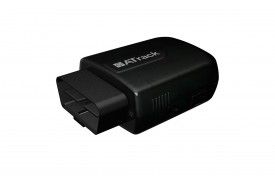


The ATrack AX9 is a versatile GPS tracking unit that offers a range of features and capabilities. With its OBD-II interface and plug-and-play installation, the AX9 is incredibly easy to set up and use. It is compatible with both 2G and 3G networks, providing flexible wireless network options for reliable and efficient communication.
One of the standout features of the AX9 is its ultra-low current consumption in deep sleep mode, ensuring minimal power usage when the device is not actively transmitting data. This makes it an ideal choice for long-term tracking applications where battery life is a concern. Additionally, the AX9 boasts high GPS sensitivity, ensuring accurate and reliable positioning information.
The AX9 also offers a range of advanced features for comprehensive tracking and monitoring. It has a built-in 3-axis G-sensor for detecting and reporting harsh driving behavior events, allowing fleet managers to monitor driver safety and performance. The device also supports OBDII data collection, enabling the tracking of vehicle diagnostics and fuel economy calculations. With user-defined reports and configurable event control, the AX9 can be customized to meet the specific needs of various applications, including usage-based insurance, car rental, fleet management, and teenage driver tracking.
Overall, the ATrack AX9 is a powerful and versatile GPS tracking unit that offers a wide range of features and capabilities. Its easy installation, flexible network options, and advanced tracking capabilities make it an ideal choice for a variety of applications.
Outstanding Features:
- Plug-and-play installation
- Flexible wireless network options
- Ultra-low current consumption in deep sleep mode
- High GPS sensitivity
- Built-in 3-axis G-sensor for detecting harsh driving behavior events
- OBDII data collection for vehicle diagnostics and fuel economy calculations
- User-defined reports and configurable event control
Set Up AX9
To set xZqbom you need to configure as follows. With the following script
- Set ACC event
ZwlHvIVCn9G
aenrU2EdABS7eCrjPBVPduKt8qz0
PUZJ911z7cHrrOV5HN1ZFMPW2mm0
0K2Xu8OQAzvyz - Set time interval to 60 seconds
f3ZXTsBUSNaUFUzwSm - Set to binary mode
ZPFaQ2t63kXU7WGqo - Set the GPRS server
KqPEPT3oFJA11iDTlkOJYnYhC3yNhNjfraSwCBhYmzoVMZwK3WPBWAERgVoewztAE4lNnKLcj
To check device status dnLHUMhHk


